
Create IdP for Wechat Miniapp
Unlike the IdP used for single page web application, for Wechat miniapp, it will associate the Identity application(directory) with a client called "Wechat mini-app federated client", after the federated client is associated, it means the IdP will trust its authentication done then an "authentication federation" is achieved.
TIP
Authentication Federation means that once a miniapp user is authenticated by the WeChat authentication/authorization server, your SiX IDaaS & IAM tenancy trusts that authentication directly. This eliminates the need for redundant authentication of the same user through the platform's own servers.
During this process, a Shadow User is automatically created within the Identity Application (directory) to represent the miniapp user (linked to their unique mobile identity).
This implementation supports the concept of a Unified Digital Identity: since the same IdP can be utilized across various platforms—such as SPAs or Native Apps—the user maintains a consistent identity and shares the same ID Token and profile across different applications.
Interaction flows
Below is the typical flow that one or more Wechat miniapp leveraging SiX IDaaS & IAM to achieve authentication federation.
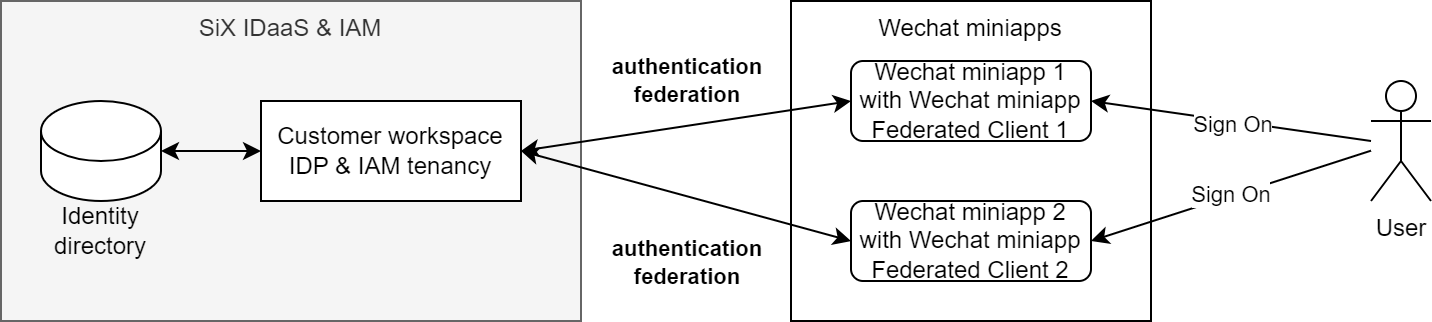
Steps to create IdP for Wechat miniapp
1. Create an Identity application
Login the SiX IDaaS & IAM console.
Navigating to menu: "Authentication->Create Identity Application(IdP)" to create the Identity application for the Wechat miniapp.
2. Create one Wechat miniapp "Third Party Authz Client" and associate it with Identity application
Login the SiX IDaaS & IAM console.
Navigating to menu: "Authorization->Create Third Party Authz Client" to create the Wechat miniapp "Third Party Authz Client" and bind this client to the "Identity Application".
3. Federate with Wechat miniapp authentication
After the miniapp user authenticated with Wechat authentication/authorization server, it will generate a "Authorization Code" only recognized by Wechat.
Your miniapp logic can use this "Authorization Code" to exchange an ID token and access token generated by customer SiX IDaaS & IAM authentication/authorization tenant server in case this miniapp user was registered previously in IdP.
TIP
Use the API "/federation/wechat/miniapp/profile" endpoint in API doc to exchange the tokens.
In case the miniapp user wasn't regiestered, your miniapp logic can initiate the user "registration/bind" operation.
TIP
Use the API "/federation/wechat/miniapp/bindUser" endpoint in API doc to register/bind miniapp user.
Samples
Wechat miniapp IdP sample code repo
TIP
If you can't access the repo, please contact us via the contact info on Contact Us