
Federate IdP with OKTA
OKTA is a renowned identity solution provider that many companies choose to integrate with their company’s Active Directory (AD). After the integration, company users gain the ability to use Single Sign-On (SSO) across these applications.
For your newly developed app, you can federate Okta with the IdP (Identity Application) created in the SiX IDaaS & IAM tenancy. By enabling authentication federation, your application users can log in using their Okta credentials, while authorization can be centrally managed through the IAM system within the SiX IDaaS & IAM workspace.
Federation Example
An example for federating with Okta
PS: SiX IDaaS & IAM IDP acts as an federating(intermediary) Identity Provider (IdP) between a primary, upstream IdP (Okta) and a Service Provider (Salesforce).
Enhanced Security
After federation, your IdP user will benefit from MFA, personal information sharing consent control, more at: Overview of Data Security & Privacy
Delegated Authentication
Authentication federation refers to authentication delegation. After the Identity Provider (IdP) in the SiX IDaaS & IAM tenancy receives the authentication request, it delegates the request to the Okta IdP.
Steps to federate IdP with OKTA
1. Create an SiX IDaaS & IAM IdP(identity application)
On SiX IDaaS & IAM console, go to "Authentication -> Create Identity Application" to create an IdP(identity application), change the "Authentication Sources:" to "SAML2 authentication source(identity provider)".
2. Set the federated OKTA IdP "SAML2 client" parameters
Set the federated OKTA IdP "SAML2 client" parameters. 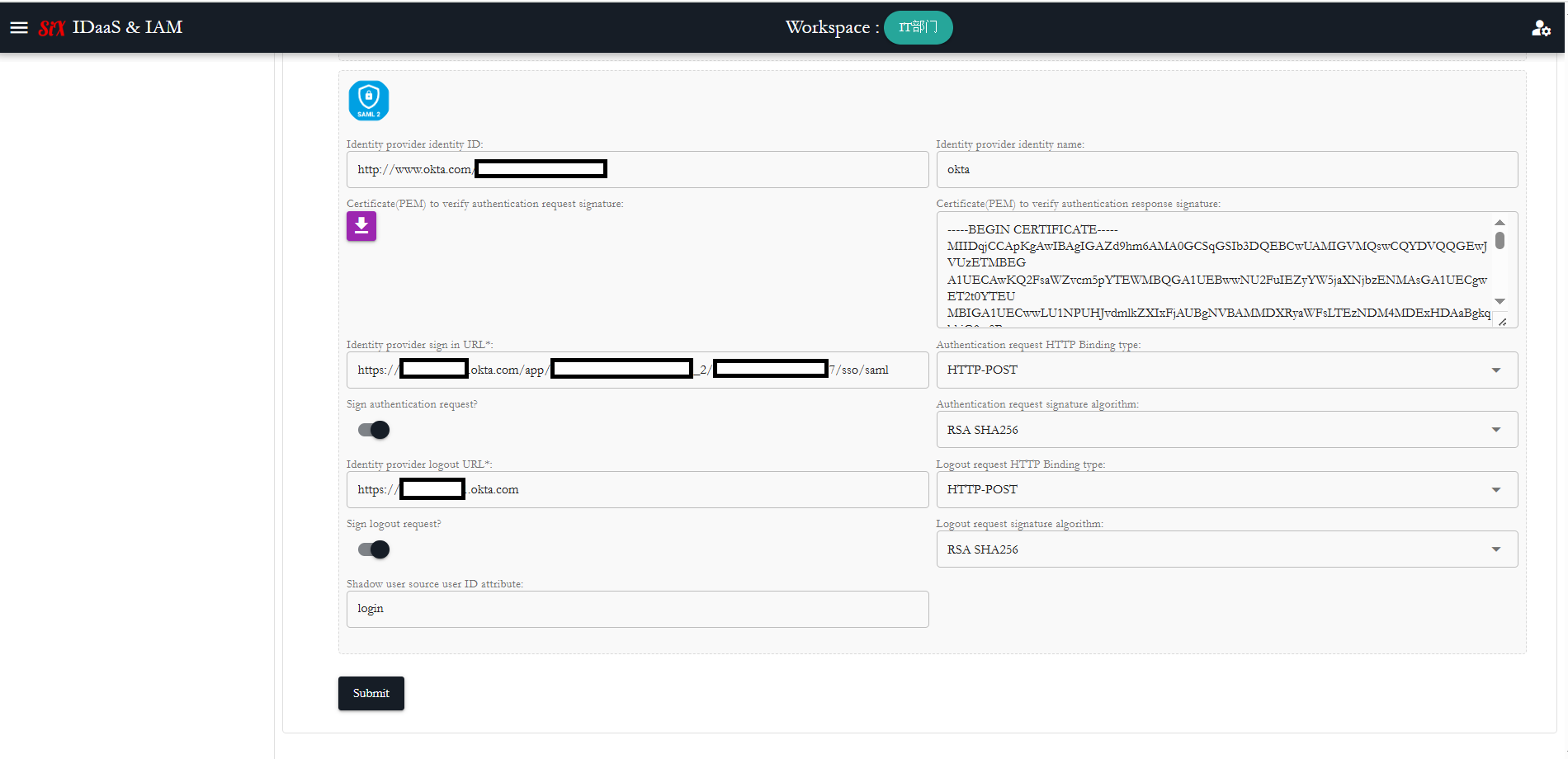
Note
Please ensure to set the "Assertion Consumer Service" URL of the federating IDP to federated SAML IDP, Url is: “https://{appDomain}/sp/saml2/acs/{spIdentityId}”, use the ID of identity application as {spIdentityId}!
Ensure your federated SAML IdP is correctly configured with the right parameters!
3. Create an OAuth2 Client and associate it with IdP
Creaate an OAuth2 Client on the SiX IDaaS & IAM console and associate it with IdP(identity application).
4. Use the OAuth2 Client in your application
Apply the OAuth2 Client information in your application to initiate the authentication process, when the authentication process is triggered, SiX IDaaS & IAM will handle the authentication federation process automatically.
TIP
Since the SiX IDaaS & IAM OAuth2 client also support the SAML2 protocol, you can still use your existing SAML2 client in your application, you need to switch your SAML2 client connecting parameters. an example at: SSO integration with Salesforce as SP
TIP
Since the SiX IDaaS & IAM OAuth2 client also support the SAML2 protocol, you can still use your existing SAML2 client in your application, you need to switch your SAML2 client connecting parameters. an example at: SSO integration with Salesforce as SP
5. Your application get ID information and associate it with your local user ID
You can get the IdP tenant "openId" and the ID of federated OKTA SAML2 provider user through parsing JWT and use /userinfo endpoint.